Fore and Foremost
RIL is a library that acts as a bridge between your device's phone functions and the radio firmware in your device's communications chip (radio). Matching radio and RIL is always a good combination when you think of signal stability and battery consumption. That is why you should flash a matching RIL when you flash a new radio. Only for Sense based ROMs (not for CM or MIUI). You DO NOT need to flash a RIL if you use a recommended radio for a ROM. You need to flash RIL again if you flash another ROM.
How to flash:
Flash in ClockworkMod like a ROM, but do not wipe anything. You have to flash the RIL again if you flash a new ROM some day.
RIL files for HTC Desire HD Radios :
RIL for 12.28b.60.140e_26.03.02.26_M - HTC WWE 1.32.405.6
RIL for 12.28e.60.140f_26.04.02.17_M2 - HTC WWE 1.72.405.3
RIL for 12.28e.60.140f_26.04.02.17_M2_SF - HTC WWE 1.72.405.3 R2
RIL for 12.28g.60.140f_26.05.05.27_M3 - Orange UK 1.84.61.2
RIL for 12.35d.60.140f_26.06.03.24_M2 - TELUS WWE 1.84.661.1
RIL for 12.39.60.19_26.06.04.06_M - Cingular US 1.80.502.3
RIL for 12.41.60.19_26.06.04.14_M - HTC Ace Gingerbread S Generic 2.16.0.0
RIL for 12.35d.60.140f_26.08.03.07_M - HTC Ace Gingerbread S Generic 2.25.0.0
RIL for 12.54.60.25_26.09.04.11_M2 - HTC Ace 2.50.405.2 WWE
RIL for 12.56.60.25_26.10.04.03_M - TELUS WWE 2.43.661.1 (thanks to xda user enursed for extracting libs)
RIL for 12.65.60.29_26.14.04.28_M - HTC Ace 3.12.405.1 WWE
Credit to :
jkoljo - For this guide & information
Whiskey103 - Hosting the file
mike1986 - For all his good deeds
visits : forum.xda-developers.com
Sunday, December 25, 2011


PC10IMG.zip update method - HTC Vision Radio's
This guide was taken from forum.xda-developers.com Credits to joemm for this guide. I put the guide in my blog, so that anybody who search for HTC phones can find it easily. There will be some word that will be paraphrased, but will retain their meaning so that, there's no false information being given to you.
WARNING: FLASHING RADIOS CAN BE DANGEROUS. DO NOT DO ANYTHING TO YOUR PHONE THAT YOU DO NOT TOTALLY UNDERSTAND. REMEMBER TO RESEARCH FIRST. ALL THE DOWNLOADS HERE HAVE BEEN TESTED TO WORK. I AM NOT RESPONSIBLE IF YOU TRANSFORM YOUR HTC VISION INTO A BRICK.- joemm
For your information, The andriod .txt files this PC10IMG.zip already set to superCID 11111111.
In rare cases where you received a CID(Carrier IDentification) error while flashing PC10IMG.zip to your HTC Phone, try setting your CID to superCID 11111111 via GFree. How? Click HERE. As mentioned before, it's a rare cases for you to received such error.
If no error occured, you can follow the steps below :
1) Download the desired radio file.
2) Rename the file to PC10IMG
IMPORTANT NOTE:
You must rename the downloaded radio file name to PC10IMG in order for it to work. Because the file that you will download will not be named as PC10IMG to keep you out of confusion. :). So, after download the desired Radio File, name it into PC10IMG.
3) Place the PC10IMG.zip radio file on the root of you SD card. Where is the root? Click HERE.
4) Switch off your phone.
5) Hold the volume button down and press power on.
6) The phone will boot into Hboot then Bootloader, It should see the PC10IMG.zip and ask if you want to apply the zip.
7) Use the volume up button to select "yes" if not mistaken, there should be a legend there stating which button for which function.
8) Once its done flashing, reboot the phone and you should have a new radio.
IMPORTANT: Remember to remove or rename the PC10IMG.zip from the root of your sd card when finished, because if for some reason you need to get into recovery from bootloader, you will not be able to because it will see the PC10IMG.zip file and want to update instead.
NOTE: The above mentioned instructions is the only way to flash the PC10IMG radio files. You can not flash the PC10IMG radio files in ClockWorkMod Recovery like a ROM, it will not work.
RIL FILE LIBRARIES (Want to know more about Ril File? Click HERE) :
If you are interested in matching the ril file libraries you can GO HERE TO RMK40's THREAD, and download his Radio to RIL Automatcher. This will automatically detect which radio you are running and match the correct ril library for it and install it too. (thanks to pfak and rmk40 for their work). Please post all ril related issues in RMK40's thread. Remember don't make changes to your phone unless you know what those changes will do and also how to revert back.
WARNING: FLASHING RADIOS CAN BE DANGEROUS. DO NOT DO ANYTHING TO YOUR PHONE THAT YOU DO NOT TOTALLY UNDERSTAND. REMEMBER TO RESEARCH FIRST. ALL THE DOWNLOADS HERE HAVE BEEN TESTED TO WORK. I AM NOT RESPONSIBLE IF YOU TRANSFORM YOUR HTC VISION INTO A BRICK.- joemm
For your information, The andriod .txt files this PC10IMG.zip already set to superCID 11111111.
In rare cases where you received a CID(Carrier IDentification) error while flashing PC10IMG.zip to your HTC Phone, try setting your CID to superCID 11111111 via GFree. How? Click HERE. As mentioned before, it's a rare cases for you to received such error.
If no error occured, you can follow the steps below :
1) Download the desired radio file.
2) Rename the file to PC10IMG
IMPORTANT NOTE:
You must rename the downloaded radio file name to PC10IMG in order for it to work. Because the file that you will download will not be named as PC10IMG to keep you out of confusion. :). So, after download the desired Radio File, name it into PC10IMG.
3) Place the PC10IMG.zip radio file on the root of you SD card. Where is the root? Click HERE.
4) Switch off your phone.
5) Hold the volume button down and press power on.
6) The phone will boot into Hboot then Bootloader, It should see the PC10IMG.zip and ask if you want to apply the zip.
7) Use the volume up button to select "yes" if not mistaken, there should be a legend there stating which button for which function.
8) Once its done flashing, reboot the phone and you should have a new radio.
IMPORTANT: Remember to remove or rename the PC10IMG.zip from the root of your sd card when finished, because if for some reason you need to get into recovery from bootloader, you will not be able to because it will see the PC10IMG.zip file and want to update instead.
NOTE: The above mentioned instructions is the only way to flash the PC10IMG radio files. You can not flash the PC10IMG radio files in ClockWorkMod Recovery like a ROM, it will not work.
RIL FILE LIBRARIES (Want to know more about Ril File? Click HERE) :
If you are interested in matching the ril file libraries you can GO HERE TO RMK40's THREAD, and download his Radio to RIL Automatcher. This will automatically detect which radio you are running and match the correct ril library for it and install it too. (thanks to pfak and rmk40 for their work). Please post all ril related issues in RMK40's thread. Remember don't make changes to your phone unless you know what those changes will do and also how to revert back.
Saturday, December 24, 2011
Where / What is the root of your HTC Phones SD Card?
Hi all,
I want to tell this to everyone who still doesn't know and those who afraid to ask the pro's in the forum because they afraid to be labeles as NOOB??? Well, don't worry, I have the answer of your question.
I've put it in simple word.
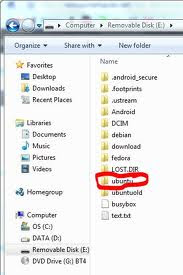
The root of your HTC SD Card is the first page you'll see if you open it by using your Laptop / PC.
Still blur?
When you plug your android into USB and turn on USB storage, (a "your SD Card Memory Size"GB file opens that contains android, bluetooth, data, DCIM, LOST.DIR files etc.This is your HTC SD Card Root folder.
See picture below. You can see on the ADDRESS bar >Computer>Removable Disk "your drive letter", "The first page of your SD Card" is the root. More or less the same.
Thanks for reading. :) Do come again.
I want to tell this to everyone who still doesn't know and those who afraid to ask the pro's in the forum because they afraid to be labeles as NOOB??? Well, don't worry, I have the answer of your question.
I've put it in simple word.
The root of your HTC SD Card is the first page you'll see if you open it by using your Laptop / PC.
Still blur?
When you plug your android into USB and turn on USB storage, (a "your SD Card Memory Size"GB file opens that contains android, bluetooth, data, DCIM, LOST.DIR files etc.This is your HTC SD Card Root folder.
See picture below. You can see on the ADDRESS bar >Computer>Removable Disk "your drive letter", "The first page of your SD Card" is the root. More or less the same.

Thanks for reading. :) Do come again.
How to get into Hboot on your HTC Sensation Phone?
Hey guys,
Before you go and flash new rom on your HTC devices, please check that you already have S-off. Well, what's the problem? Not Sure whether your already have S-off because you just bought your phone yesterday? You don't know how to check? Don't worry, It's not that hard to check.
Just follow the simple easy steps below :
Note : For HTC Sensation : Go to Setting > Power > Untick the Fastboot before you do step 1.
1) Turn OFF your HTC Phones.
2) Press POWER BUTTON + VOLUME DOWN BUTTON
3) You should see white screen with androids on skateboards. Refer picture below.
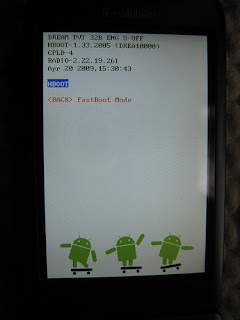
4) There you go, in this page, you can see whether you have S-ON or S-OFF. If you have S-ON and if you want to S-OFF your HTC devices, click HERE for the GUIDE.
*** Note : If the first line ends in SHIP S-OFF, you have S-OFF through gfree. If the first line ends in ENG S-OFF, you have S-OFF through the engineering bootloader (and maybe gfree as well---you can check out the Wiki for an app on how verify whether or not gfree was used).
Regardless, if you have S-OFF through either method, you can flash a new radio. You do not need the engineering HBOOT to flash a radio (or custom ROMs). The engineering HBOOT simply allows you to use fastboot to flash partitions on your phone while in the bootloader. If you do not have the engineering HBOOT, you can flash the radio through the PC10IMG.zip update method.
Before you go and flash new rom on your HTC devices, please check that you already have S-off. Well, what's the problem? Not Sure whether your already have S-off because you just bought your phone yesterday? You don't know how to check? Don't worry, It's not that hard to check.
Just follow the simple easy steps below :
Note : For HTC Sensation : Go to Setting > Power > Untick the Fastboot before you do step 1.
1) Turn OFF your HTC Phones.
2) Press POWER BUTTON + VOLUME DOWN BUTTON
3) You should see white screen with androids on skateboards. Refer picture below.

4) There you go, in this page, you can see whether you have S-ON or S-OFF. If you have S-ON and if you want to S-OFF your HTC devices, click HERE for the GUIDE.
*** Note : If the first line ends in SHIP S-OFF, you have S-OFF through gfree. If the first line ends in ENG S-OFF, you have S-OFF through the engineering bootloader (and maybe gfree as well---you can check out the Wiki for an app on how verify whether or not gfree was used).
Regardless, if you have S-OFF through either method, you can flash a new radio. You do not need the engineering HBOOT to flash a radio (or custom ROMs). The engineering HBOOT simply allows you to use fastboot to flash partitions on your phone while in the bootloader. If you do not have the engineering HBOOT, you can flash the radio through the PC10IMG.zip update method.
Rooting Android Phones/Devices
Hi to all ANDROID fans and user,
If you have these question below running around in your mind, well, I bit you welcome to my blog as you might be interested of what I'm going to tell you.
Question :
1) Do you know what is rooting?
2) Is it legal?
3) What benefit from rooting/jailbreaking your devices?
4) What is the consequences of rooting your devices?
5) Who will not happy if you root/jailbreak your phone?
6) How to perform Jailbreak/rooting on my devices?
7) Do I need to have knowledge in an android phones to be able to root/jailbreak?
Answer :
1) Do you know what is rooting?
Rooting is a process where after you do it correctly, will grant you the title of the superuser of you devices. Why superuser? Because, a rooted android phone will give you the root and unrestricted access to your Android Devices. Let’s say everyday you want to use certain application that is restricted to you, if you not yet perform the rooting process to your devices, you will be restricted(Pain in the ass). So, if you root your devices, IT WILL GRANT YOU the TITLE "SUPERUSER", which means you control everything.:)
2) Is it legal?
Well you might be asking whether it is legal or not. It is not legal, not until recently. According to the latest rule, there's been an exception for software that enables a wireless phone to execute software applications. (Your phone is wireless + rooting uses a software = LEGAL) :)
3) What benefit from rooting/jailbreaking your devices? The benefit of rooting your devices is it allow the phone to install and run third-party applications. Other than that, rooting your devices gives you the administrative control. Rooting also allows you to install a custom ROM to run versions of Android that the device maker doesn’t supply or support.
4) What is the consequences of rooting your devices?
If you execute the rooting process, you will void your warranty. Android Authority disclaims all liability for any harm that may befall on your device, including, but not limited to, bricked phones, voided manufacturer warranties, exploding batteries, etc. ***So, proceeds with care***
5) Who will not happy if you root/jailbreak your phone?
The carriers and Phones maker. So don't call them asking for help regarding rooting your devices.
6) How to perform Jailbreak/rooting on my devices?
For your information, for every phones model, you need specific rooting process unless mentioned that you can use the same method. In this blog, I will gives guide on how to root HTC Phones only. The guide might be taken from others and the problem + solution during process will be provided, if available. :) So, CREDITS to the person who write the guide. I may not be the one who make the guide, because I'm here to guide you regarding HTC Phones only.
7) Do I need to have knowledge in an android phones to be able to root/jailbreak?
Not exactly, you just need the ability to read what I'm going to write, and of course understanding the terms used in rooting process then you should be fine.
If you have these question below running around in your mind, well, I bit you welcome to my blog as you might be interested of what I'm going to tell you.
Question :
1) Do you know what is rooting?
2) Is it legal?
3) What benefit from rooting/jailbreaking your devices?
4) What is the consequences of rooting your devices?
5) Who will not happy if you root/jailbreak your phone?
6) How to perform Jailbreak/rooting on my devices?
7) Do I need to have knowledge in an android phones to be able to root/jailbreak?
Answer :
1) Do you know what is rooting?
Rooting is a process where after you do it correctly, will grant you the title of the superuser of you devices. Why superuser? Because, a rooted android phone will give you the root and unrestricted access to your Android Devices. Let’s say everyday you want to use certain application that is restricted to you, if you not yet perform the rooting process to your devices, you will be restricted(Pain in the ass). So, if you root your devices, IT WILL GRANT YOU the TITLE "SUPERUSER", which means you control everything.:)
2) Is it legal?
Well you might be asking whether it is legal or not. It is not legal, not until recently. According to the latest rule, there's been an exception for software that enables a wireless phone to execute software applications. (Your phone is wireless + rooting uses a software = LEGAL) :)
3) What benefit from rooting/jailbreaking your devices? The benefit of rooting your devices is it allow the phone to install and run third-party applications. Other than that, rooting your devices gives you the administrative control. Rooting also allows you to install a custom ROM to run versions of Android that the device maker doesn’t supply or support.
4) What is the consequences of rooting your devices?
If you execute the rooting process, you will void your warranty. Android Authority disclaims all liability for any harm that may befall on your device, including, but not limited to, bricked phones, voided manufacturer warranties, exploding batteries, etc. ***So, proceeds with care***
5) Who will not happy if you root/jailbreak your phone?
The carriers and Phones maker. So don't call them asking for help regarding rooting your devices.
6) How to perform Jailbreak/rooting on my devices?
For your information, for every phones model, you need specific rooting process unless mentioned that you can use the same method. In this blog, I will gives guide on how to root HTC Phones only. The guide might be taken from others and the problem + solution during process will be provided, if available. :) So, CREDITS to the person who write the guide. I may not be the one who make the guide, because I'm here to guide you regarding HTC Phones only.
7) Do I need to have knowledge in an android phones to be able to root/jailbreak?
Not exactly, you just need the ability to read what I'm going to write, and of course understanding the terms used in rooting process then you should be fine.
Friday, December 23, 2011
Downloader - HTC Software
I will post Download Manager for HTC Phones here. I hope you guys likes it. :)
Note : This blog is still underconstruction, so i'm sorry for the inconvenience caused.
List of HTC Download Manager :
1) Download Faster 1.2.apk
This is the top Download Manager for Android now.
Note : This blog is still underconstruction, so i'm sorry for the inconvenience caused.
List of HTC Download Manager :
1) Download Faster 1.2.apk
This is the top Download Manager for Android now.
Faster Download 1.2 (Free)

Faster Download 1.2 Requirement :
Current Version : 1.2
Requires Android : 1.6 and up
Size : 430KB
Dear HTC Users, have you ever used Internet Download Manager before? Well, in simple word is, Download Faster 1.2 is like Internet Download Manager different is, IDM is for PC and Download Faster 1.2 is for Android, or specifically for your devices. :) . It's speed, and stability will surely make you don't want to use other download manager in your HTC.
Why Download Faster 1.2 download file faster than the others? Because Download Faster 1.2 avoid the limitation for the download speed by Android and boost your download speed even more when you enable the built-in Multi-Threaded Download.:)
Note : This download manager is best paired with Miren Browser. Other browser like Mozilla, Opera, Dolphin etc will block other application and they(The Apps) can't intercept the Intents required. So, when you download "Download Faster 1.2", paired it with Miren Browser so that you can boost the true potential of Download Faster 1.2.
Download Links :
Click HERE to download - Link 1
Click HERE to download - Link 2 <I recommend you click this
Subscribe to:
Posts (Atom)